RetainLogRetain records

Retains entered, signed off and disposed of, in your Excel workbook.

RetainLog opens the workbook you keep today and builds an entry form from its own column headings. Stage retains into the right rows, search every sheet at once, queue the corrections, sign boxes off month by month, and print what is due for disposal. Nothing is written until you save, and a save keeps your formatting, formulas and the rest of the workbook. It runs from a file in Chrome or Edge, offline, with nothing sent anywhere.

Coming soon - $249Watch it work
Quality and manufacturingComing soon
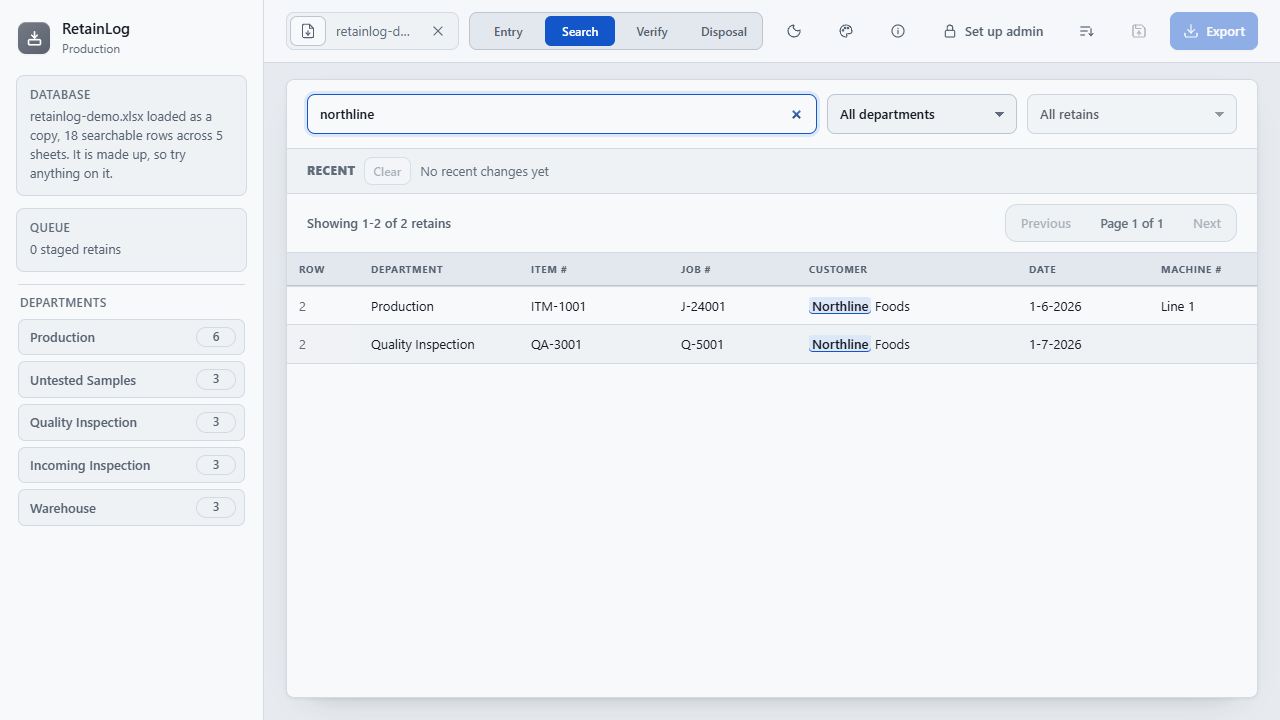
RetainLog with the demo workbook open: departments in the sidebar, and a search for Northline finding retains on two sheets.
The demo workbook: five departments in the sidebar, one search across all of them, and each retain listed with the Excel row it sits on.
Price
$249 once, for your whole organization.
Delivery
Download straight after payment. One HTML file that opens in Chrome or Edge: no install, no launcher, no network.
Updates
Version 1.7.1 today. Every 1.x release, from the same download link.

Watch it work

Entry, search, sign-off and disposal, in under half a minute.

The walkthrough built into RetainLog, run on the demo workbook: staging a retain from the form, searching every sheet, signing a box off, the retains due for disposal, and what stays on your machine. It has no sound; the captions tell the story.

How it works

Three steps, and the workbook stays yours.

Open the workbook

The one you keep today, or a blank one from the template. Each sheet is a department, the header row decides the columns, and a Read Me or notes sheet is left out rather than read as retains. To try it first, choose Admin and Load demo on the Settings page for a fictional workbook.

Stage, search, sign off, dispose

Fill in the form and stage retains, search every sheet and queue the corrections and deletions, sign boxes off in Verify, and mark retains disposed when their keep period is up. Everything waiting is listed under Recent with an Undo, and nothing is written until you save.

Save it back

Everything queued goes into the workbook at once, each retain in its row, as a copy or, in admin mode, over the original. If someone edited the workbook in Excel meanwhile, Reload Database takes the newer file and your queued changes follow their rows into it.

What it does

Entry, Search, Verify and Disposal, in one file.

Nothing is tied to one way of keeping retains. The departments and columns come from your workbook, and the checks learn each sheet’s habits from the rows already in it rather than from a department’s name.

Entry

New retains, the right row
  • An entry form built from that sheet's own headings
  • Stage as many retains as you like, written together
  • The queue survives closing the browser, and every window shares it
  • A new retain lands where the sheet's own order puts it
  • Save as, or Overwrite in admin mode, stages and saves in one step

Search and fix

Every sheet at once
  • A phrase in quotes, one column with job:J101, and -void to exclude
  • Needs fixing: missing dates, boxes that are not numbers, a Month against its Date
  • Item and job numbers that do not look like the rest of that sheet's
  • Click a row to queue a correction or a deletion
  • Sort the results by a column, and save the whole Database in that order
  • Recent lists every waiting change with an Undo, until you save

Verify and dispose

Sign boxes off, and see what is due to go
  • Each month's boxes, on every sheet with Box # and Verified
  • The checker's initials against every retain in a box
  • Keep for a set number of months per department, saved in the workbook itself
  • Or a Retain Until, Discard By or Expiry column dates each retain on its own
  • Due now, due in 30 days, disposed or all, down to a single box
  • Marked disposed with the date and initials, never deleted
  • Print list gives the list with lines for who disposed, the date and a witness

Your workbook

Nothing to migrate
  • Opens the workbook you already keep, and leaves it in its own order
  • Formatting and formulas kept: fonts, fills, borders, number formats, widths
  • Dates read however they are written, day first or month first
  • #REF! and #VALUE! cells shown as Excel shows them, and kept with their formulas
  • A heading merged across columns names each column under it
  • Notices a change made in Excel, and asks before saving over it
  • A blank template with typed columns, a demo workbook and the walkthrough, built in

One file, two modes

A copy for everyone, and one person who saves over.

Locked, for the floor

How RetainLog opens, every time. Everyone who adds or checks retains stages, searches, signs off and disposes; Save as and Export write an updated copy, and the workbook that was opened is never changed, so a mistake costs a copy and nothing else.

Admin mode, for the workbook's keeper

Unlocked with a passcode kept inside the workbook itself, so every computer that opens it asks for it. Adds Overwrite, which writes the queue straight into the open workbook after one question, and the settings: the passcode, your site's words, quick-fill lists the form offers as people type (kept in the workbook, not the app), the blank template and the demo. Keep a backup of any workbook you save over.

What it is not

RetainLog is a record-keeping aid for a workbook you control. It is not a validated quality management system, a LIMS or a document control system, and it does not by itself make a retain procedure compliant with any standard. Check your workbook and your procedure against your own quality system before relying on it.

A save keeps the workbook’s formatting and formulas: each row’s fonts, fills, borders and formulas follow it through inserts, corrections and sorting, a new retain takes the look and formulas of the rows around it, and a sheet whose formulas refer to other rows is never re-sorted. Excel tables, pictures and charts, notes, hyperlinks and formatting on part of a cell’s text are not carried over, so keep a copy of a workbook that relies on them. Dates are written back as m/d/yyyy.
Price

$249, once. Every computer you have.

One payment licenses RetainLog to your organization, not to a seat, so everyone who keeps retains can use it. The download starts as soon as payment completes, the link is emailed to you, and the same link fetches every 1.x update. Stripe sends the receipt and an invoice for your records.

All sales are final. RetainLog is a one-time purchase, not a subscription, and the copy you download is yours to keep. Watch the walkthrough to see whether it fits before you buy.

RetainLog goes on sale soon.

Coming soon - $249Watch it work

If there is ever a 2.0. It is a new purchase; your 1.x license keeps working and keeps getting 1.x releases.

Questions before or after buying go to support@alderworks.dev and reach someone who worked on RetainLog. Answered by email, as soon as we can; we do not promise a response time.

What IT will ask. The license agreement that comes in the download, what the tool sends and stores in security, and what a purchase shares with us in privacy.

Checking the file. The current download is RetainLog_1.7.1.zip, 3,156,617 bytes. Its SHA-256 fingerprint is below; anyone can confirm the file they received is the one we published by running certutil -hashfile RetainLog_1.7.1.zip SHA256 on Windows or shasum -a 256 RetainLog_1.7.1.zip on a Mac, and comparing.a7e2438fc36465625b2a65401e8563b0198591a745985e73a63256ef255c2d78

Also from Alderworks

Sampling plans and pull lists for the same production runs.