CoverPlanTime off and coverage

Time off asked for, answered, and seen by the whole team.

Staff pick the days they want on a calendar and submit a request into the folder the team shares. An admin opens the same file, unlocks it with their own passcode, sees who else is off and how much notice was given, and approves or denies it with a note. Everyone sees the answer the next time CoverPlan looks. The settings and every request are ordinary Excel workbooks in that folder. It runs in Chrome or Edge on your computer, with nothing to install and nothing sent anywhere.

Coming soon - $199Watch it work
Teams and schedulingComing soon
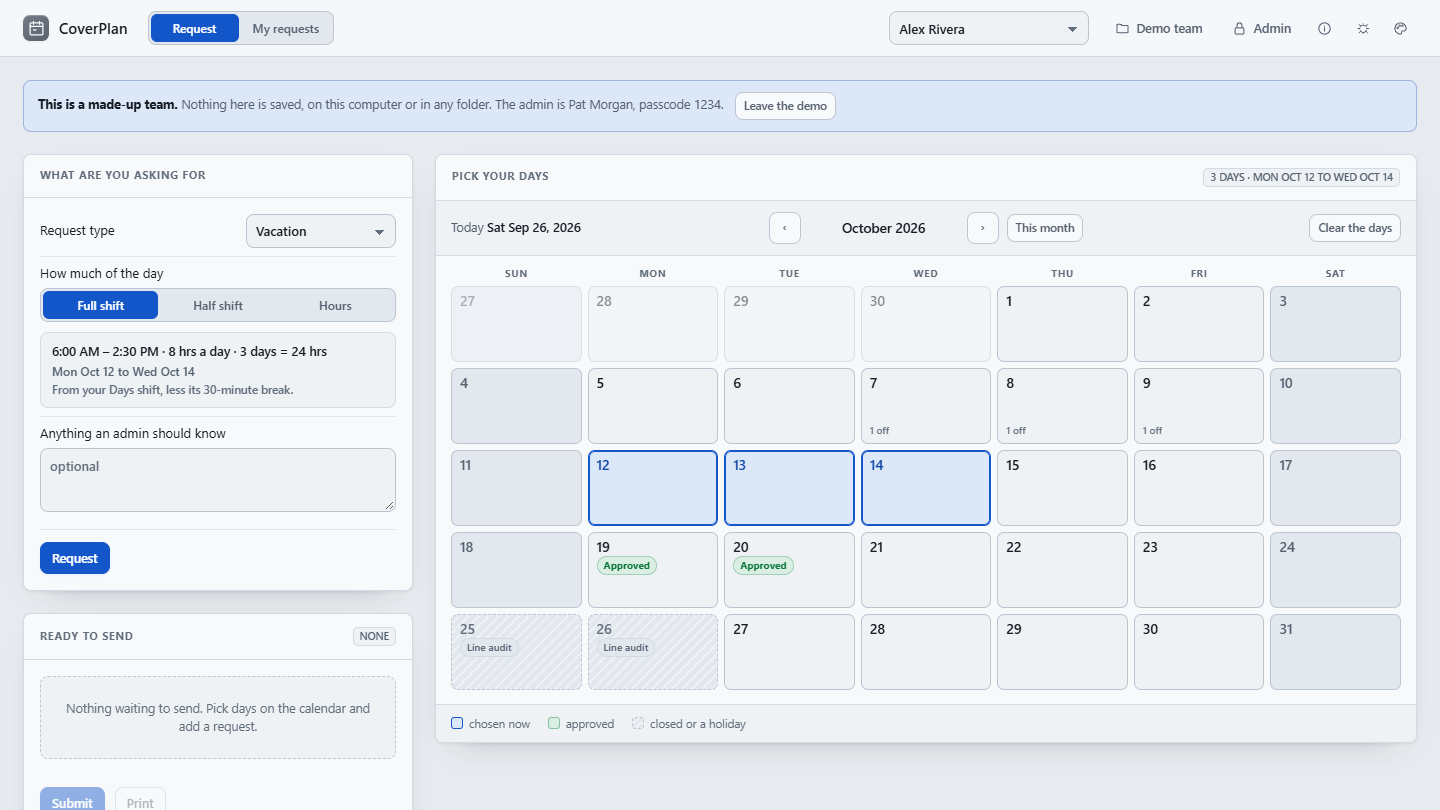
CoverPlan's Request page for the made-up team: a vacation request for Mon Oct 12 to Wed Oct 14 picked on the October calendar, the full-shift hours worked out from the Days shift, two days already approved, and two line-audit days marked closed.
A staff member picking days in the made-up team: the shift fills in the hours, approved days are marked, and the closed days cannot be picked.
Price
$199 once, for your whole organization.
Delivery
Download straight after payment. One HTML file that opens in Chrome or Edge: no install, no server, no account, no network.
Updates
Version 1.1.1 today. Every 1.x release, from the same download link.

Watch it work

From the calendar to the answer, in half a minute.

The walkthrough built into CoverPlan, played on the made-up team: picking days, Ready to send, My requests, an admin’s Review, Who is off, and the team’s settings. It has no sound; the captions tell the story.

How it works

Three steps, and every request goes the same way.

Set it up once

Make an empty folder everyone on the team can open and write to, such as a shared drive or a synced folder, and choose it in CoverPlan. Choose Admin: the first time, it asks for your name and a passcode and makes you the first admin. Add your staff and shifts on People, check the request types, closed days and holidays on Settings, and save them to the shared folder. Every other computer chooses the same folder and takes the team's settings from there.

Staff ask

Choose your name, then pick days on the calendar. Your shift fills in the hours, and a closed day, a holiday or a day already at the limit says so before you ask. Request puts it in Ready to send; Submit writes it into the shared folder. My requests shows the answer, with the admin's note, the next time CoverPlan looks.

Admins answer

Unlock with your passcode and open Review. Each request shows the notice given and who else in that location is off on each of its days. Approve or deny it with a note, and the answer is written into the request's own file. Who is off shows the month, and Export writes every request and day off to a workbook.

What it does

Asking, answering and seeing who is off, in one file.

Try it before you set anything up: Try it with a made-up team, on the first screen, opens a team of six with requests already in. The admin is Pat Morgan, passcode 1234, and nothing in the demo is saved.

Staff

Pick the days, then submit
  • Choose your name at the top, with its password if an admin gave you one
  • Click days on the calendar, or drag across a run; weekends are left out unless your team works them
  • Your shift fills in the hours: a full shift, either half, or From and To times inside it
  • A closed day, a holiday, a day already asked for or one already at the limit says so before you ask
  • Requests wait in Ready to send; nobody sees them until Submit. One request a day
  • My requests shows what is waiting, approved or denied, with the admin's note; cancel until the days start

Admins

See who else is off, then answer
  • Each admin unlocks with their own passcode; it stays unlocked on that computer until Lock
  • Review lists what is waiting, with the notice given and who else in the location is off each day
  • Approve or Deny writes the answer, and your note, into that request's file
  • If another admin answered it meanwhile, CoverPlan shows theirs instead of writing over it
  • Who is off: the month at a glance, by location, with the days at the limit shaded
  • Export to a workbook: every request, and one row per person per day off, for payroll or your records

The shared folder

Ordinary Excel workbooks, nothing else
  • CoverPlan Settings.xlsx holds the staff, shifts, request types, closed days, holidays, admins and options
  • A Requests folder holds one workbook per request, named by person, date and type
  • Every request has an ID made once and never reissued; each answer or cancellation raises its revision
  • Reading the folder twice changes nothing, and the newest word on a request wins
  • Chrome and Edge read and write the folder; another browser can save a request as a file to move in by hand

Your team's settings

Set up once, in CoverPlan or in Excel
  • Staff with a name, and optionally a shift, an employee ID and a location
  • Shifts with a start, an end and an unpaid break; a full day for anyone without one
  • Your request types, closed days and holidays, and the most off at once
  • A password for each person if you want one, and a passcode for each admin
  • Download a blank template, or the demo template, to fill in; Open a settings file reads it back
  • A workbook with only some of the sheets, such as an HR export of the staff, changes those and keeps the rest
Honest about what it is

Choosing a name is not a verified identity, and passwords and passcodes stop mistakes, not people: they are kept in the settings file as salted one-way checks, so anyone who can edit that file can change them. What keeps requests honest is who can write to the shared folder. A forgotten passcode is reset by another admin, or by clearing that admin’s Passcode check cell in the settings file.

What it is not

CoverPlan is a scheduling aid, not a payroll, timekeeping or HR system of record. It does not keep leave balances or accruals, and it does not by itself apply any law, agreement or leave policy. Check that the requests, hours and decisions it records meet your own policies before relying on it.

Price

$199, once. Your whole team, every computer you have.

One payment licenses CoverPlan to your organization, not to a seat, so every member of staff and every admin can use it. The download starts as soon as payment completes, the link is emailed to you, and the same link fetches every 1.x update. Stripe sends the receipt and an invoice for your records.

All sales are final. CoverPlan is a one-time purchase, not a subscription, and the copy you download is yours to keep. Watch the walkthrough to see whether it fits before you buy.

CoverPlan goes on sale soon.

Coming soon - $199Watch it work

If there is ever a 2.0. It is a new purchase; your 1.x license keeps working and keeps getting 1.x releases.

Questions before or after buying go to support@alderworks.dev and reach someone who worked on CoverPlan. Answered by email, as soon as we can; we do not promise a response time.

What IT will ask. The license agreement that comes in the download, what the tool sends and stores in security, and what a purchase shares with us in privacy.

Checking the file. The current download is CoverPlan_1.1.1.zip, 3,179,228 bytes. Its SHA-256 fingerprint is below; anyone can confirm the file they received is the one we published by running certutil -hashfile CoverPlan_1.1.1.zip SHA256 on Windows or shasum -a 256 CoverPlan_1.1.1.zip on a Mac, and comparing.8c9019facd127ecb6f779c6060375e6aacedcee6e5e125d213eb28234fd9735a
Also from Alderworks

The shift handover, and the rest of the shelf.