Set up the run
Choose a sample or resample run, the lanes and the positions pulled. Pick a test and its units, readings and spec limits fill in. List the cartons, and SpecRun counts every row before the first reading.
SpecRunSample and resample runs
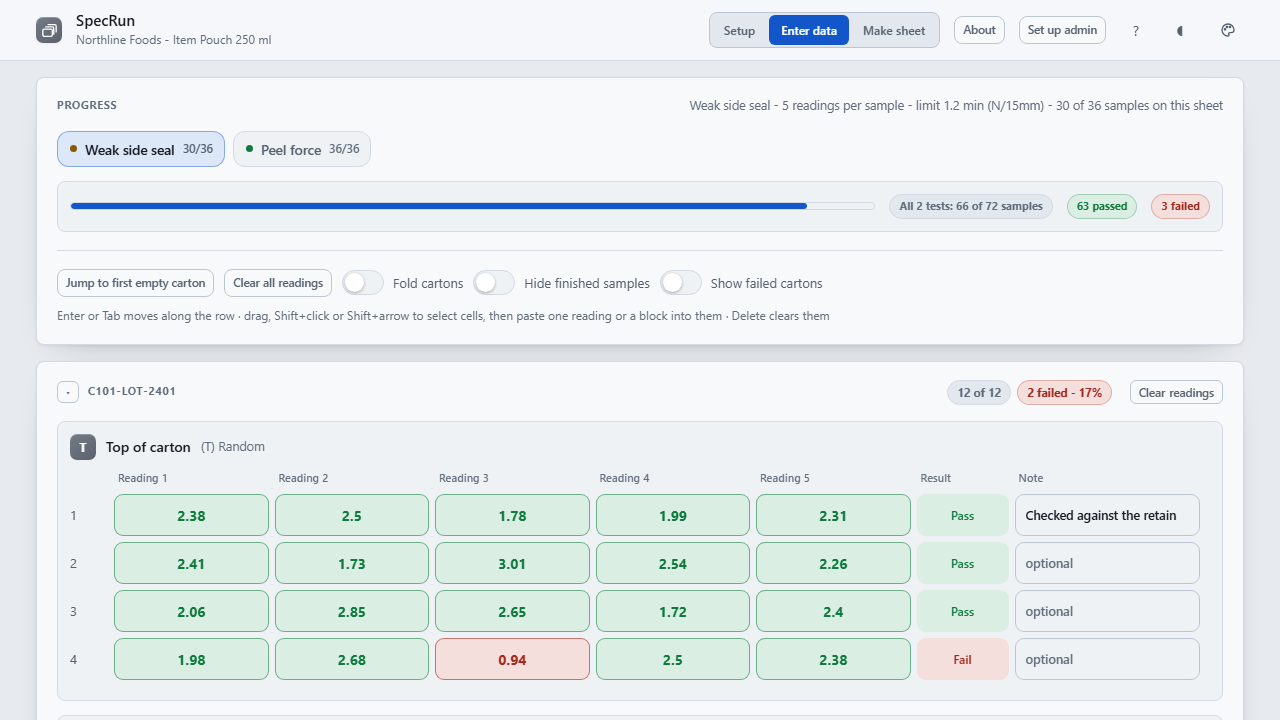
SpecRun is for whoever is taking the readings. Set up a sample or resample run, type the readings or paste them in from a tester, and anything outside your spec limits is marked as it lands, not found a week later. One press writes the Excel workbook, one sheet per test with a pass or fail formula on every row, and with it the run summary and a report to sign. It runs in Chrome or Edge on your computer, with nothing to install and nothing sent anywhere.
Watch it work
The walkthrough built into SpecRun, and in the download: a run set up, readings entered and marked, the workbook written, and the tests and columns set to match the records you already keep. It has no sound; the captions tell the story.
How it works
Choose a sample or resample run, the lanes and the positions pulled. Pick a test and its units, readings and spec limits fill in. List the cartons, and SpecRun counts every row before the first reading.
Type them in or paste blocks straight from a spreadsheet or a tester. A unit typed after a reading is taken off, 25.390 keeps its last zero, and a test whose readings are written 50,012 can be set to read them that way. Anything outside spec is marked as it lands, and a delete or a paste over readings can be undone.
Work through the list of what is still empty or failing, then write one sheet per test, every row carrying the Excel formula that gives its result. The run summary has each test's mean, spread, Cp and Cpk; the report prints ready to sign. Saving again writes over the same file, and asks first if someone else has saved it since.
What it does
It arrives with no tests, no limits and empty lists. The tests, spec limits, equipment, columns and words are yours to set, so the workbook reads the way your records already do, and one settings workbook in a shared folder sets up the rest of the team.
SpecRun is a record-keeping aid. Pass and fail come from the spec limits you enter, and Cp and Cpk are there to read rather than to certify: below about 25 readings, treat them as a rough guide. It is not a validated quality management, laboratory information or statistical process control system, and it does not by itself make a sampling plan or test method compliant with any standard. Check it against your own quality procedures before you rely on it.
Price
One payment licenses SpecRun to your organization, not to a seat, so everyone who takes readings can use it. The download starts as soon as payment completes, the link is emailed to you, and the same link fetches every 1.x update. Stripe sends the receipt and an invoice for your records.
All sales are final. SpecRun is a one-time purchase, not a subscription, and the copy you download is yours to keep. Watch the walkthrough to see whether it fits before you buy.
SpecRun goes on sale soon.
If there is ever a 2.0. It is a new purchase; your 1.x license keeps working and keeps getting 1.x releases.
Questions before or after buying go to support@alderworks.dev and reach someone who worked on SpecRun. Answered by email, as soon as we can; we do not promise a response time.
What IT will ask. The license agreement that comes in the download, what the tool sends and stores in security, and what a purchase shares with us in privacy.
Checking the file. The current download is SpecRun_1.4.1.zip, 3,755,526 bytes. Its SHA-256 fingerprint is below; anyone can confirm the file they received is the one we published by running certutil -hashfile SpecRun_1.4.1.zip SHA256 on Windows or shasum -a 256 SpecRun_1.4.1.zip on a Mac, and comparing.07ab8b2d8de8c1a89c537126e375923030f7a58b4929da16cb11dc02e492a04f
Also from Alderworks