ShiftHandoverProduction shifts

The shift handover, written once instead of typed into an email.

At the end of the shift the lead fills one form: who was on each station, what every machine ran, what went to quarantine, what was left paused, and the open items still waiting on someone. Out of it come the email, ready to paste and send, a Word document, a printout, and a handover file saved into the folder the team shares. The next lead opens that file and carries on, open items and all, until someone closes them. It runs in Chrome or Edge on your computer, with nothing to install and nothing sent anywhere.

Coming soon - $199Watch it work
Production and operationsComing soon
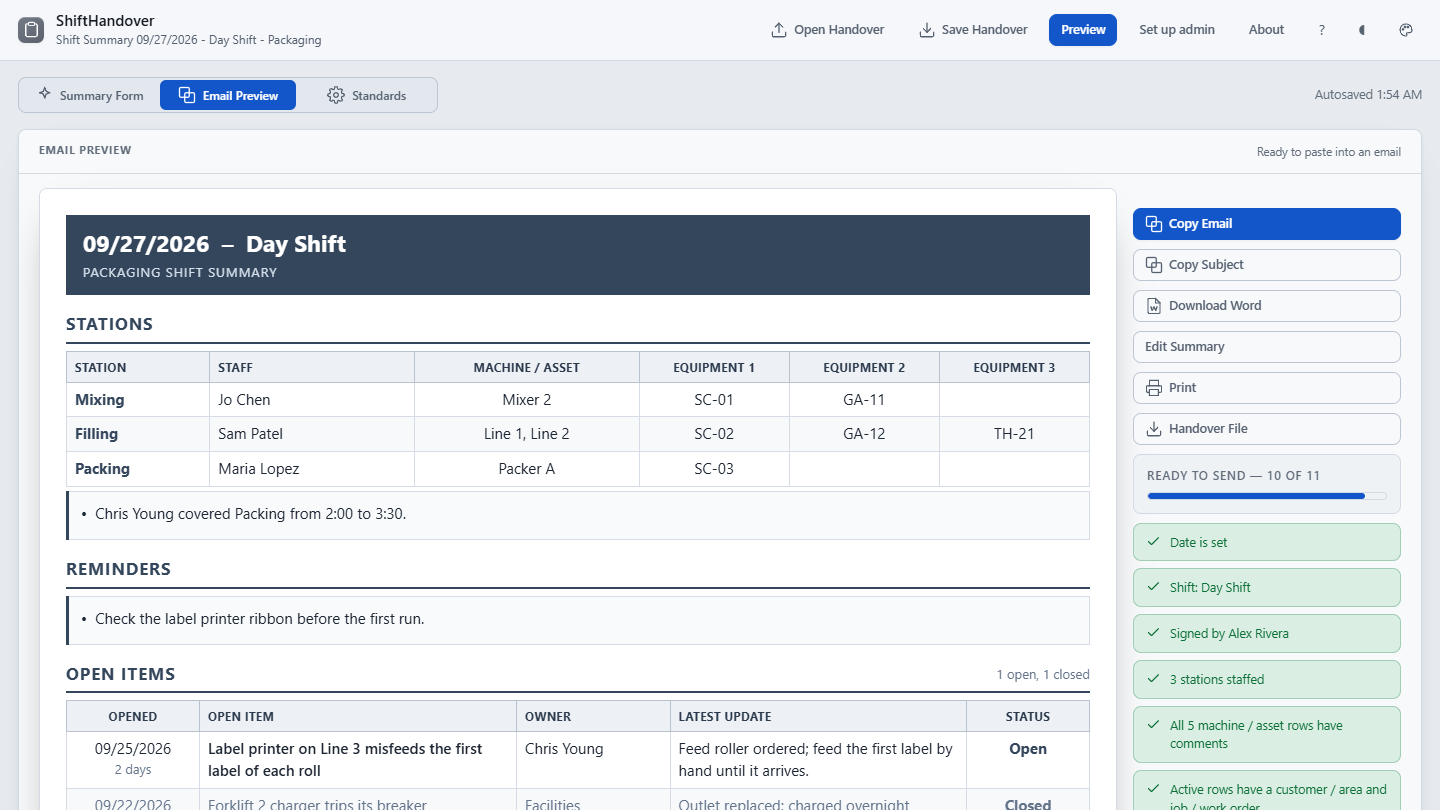
ShiftHandover showing the demo shift's email preview: stations with staff and equipment, reminders and the quarantine summary, beside the copy, Word and print buttons and the ready-to-send checklist.
The demo shift in the email preview, exactly as it pastes: stations and equipment, reminders and quarantine, with Ready to send counting off what is still missing.
Price
$199 once, for your whole organization.
Delivery
Download straight after payment. One HTML file that opens in Chrome or Edge: no install, no launcher, no network.
Updates
Version 1.4.2 today. Every 1.x release, from the same download link.

Watch it work

From the form to the handover, in half a minute.

The walkthrough built into ShiftHandover: the stations and the machine report, open items, the email preview, setting it up under Standards, and Save Handover writing into the shared folder. It has no sound; the captions tell the story.

How it works

Three steps, and every shift hands over the same way.

Set it up once

Under Standards, name your stations and equipment columns, your shift names, and the lists the form picks from: machines, customers, staff, items and jobs. Click Set folder at the foot of the form, choose the folder the shifts share, and put the settings there from Standards. Every other lead points at the same folder and is offered those settings with the first handover they open.

Fill in the shift

Fill in your name, team and shift, then open the last handover from Recent or start a new one. Pick who was on each station, what every machine ran, and add quarantine entries, paused work, open items and notes. It autosaves in the browser as you go, and Ready to send counts off what is still missing.

Send it and hand over

Copy the email and its subject line, download the Word document or print it, then save the handover file into the shared folder. The next lead opens it, sees what ran and what is still open, and carries on from there.

What it does

Everything a shift lead touches, in one file.

A new computer starts with two shift names and four stations called Station 1 to Station 4, and every other list empty. You set the stations, the equipment columns, the shift names and which sections you use, so the summary reads the way your floor already talks.

The form

The whole shift in one place
  • Stations with the staff on them and their equipment IDs
  • A row per machine or asset: customer or area, item, job, comments
  • Quarantine entries and suspended or paused work
  • Open items with an owner, a latest update and the days they have been open
  • Recurring reminders, a coverage note and shift notes

The outputs

Written once, ready every way it goes out
  • The email, formatted for pasting, with a plain-text fallback
  • The matching subject line: date, shift and team
  • A landscape Word document, Letter or A4
  • A printout of the summary sheet, without the app around it
  • Ready to send, counting off what is still missing before any of it goes

The handover

The next lead picks it up where you left it
  • One .html file that reads as the summary in any browser
  • Reopened in ShiftHandover, it fills the next shift's form, open items and all
  • Named by date, shift and team, so two teams can share one folder
  • Recent lists the last few handovers in that folder, one click to open
  • Before a save would replace another shift's file, it says when and by whom

Your floor

Set up once, shared with the team
  • 1 to 12 stations, 0 to 5 equipment columns each, named your way
  • Your shift names, paper size, date order, and a prompt for shifts past midnight
  • Quarantine entries and the Documentation Needed column on or off
  • One settings workbook for the team, put in the shared folder
  • A passcode on Standards against accidental changes, with Change passcode and Forgot the passcode?
  • Each section called what your floor calls it: Reminders, Quarantine, Open Items, Documentation Needed

Staff reports

The crew fills in their own part, if you want them to
  • Off until you turn it on: then the app opens on My report for the crew
  • Name, station, machines and equipment, rows run, quarantine entries and a note
  • Submitted into the shared folder, one file a person, sent again to change it
  • The lead unlocks admin mode with a passcode and adds each report with one click
  • A report changed after it went in replaces its first version; nothing goes missing
What it is not

ShiftHandover is a record of what happened on the shift and what is still open. It does not schedule maintenance, raise work orders or track parts, and it is not a validated quality management or manufacturing execution system. It does not by itself make a handover procedure compliant with any standard.

Price

$199, once. Every lead, every computer you have.

One payment licenses ShiftHandover to your organization, not to a seat, so every shift lead can use it. The download starts as soon as payment completes, the link is emailed to you, and the same link fetches every 1.x update. Stripe sends the receipt and an invoice for your records.

All sales are final. ShiftHandover is a one-time purchase, not a subscription, and the copy you download is yours to keep. Watch the walkthrough to see whether it fits before you buy.

ShiftHandover goes on sale soon.

Coming soon - $199Watch it work

If there is ever a 2.0. It is a new purchase; your 1.x license keeps working and keeps getting 1.x releases.

Questions before or after buying go to support@alderworks.dev and reach someone who worked on ShiftHandover. Answered by email, as soon as we can; we do not promise a response time.

What IT will ask. The license agreement that comes in the download, what the tool sends and stores in security, and what a purchase shares with us in privacy.

Checking the file. The current download is ShiftHandover_1.4.2.zip, 4,722,633 bytes. Its SHA-256 fingerprint is below; anyone can confirm the file they received is the one we published by running certutil -hashfile ShiftHandover_1.4.2.zip SHA256 on Windows or shasum -a 256 ShiftHandover_1.4.2.zip on a Mac, and comparing.864df7949399541afeb979d3ef19c5d3de18986b171f5d6001a8f48f8cb6b86b
Also from Alderworks

Sampling plans and retain logs for the same production runs.