PullPlanQA sampling

The sampling plan, the pull list, and the signed report.

Enter a production order and PullPlan finds the code letter and sample size on the AQL tables, or in the lot-size table you work to, and gives each defect class its accept and reject numbers. It lists exactly which containers to pull the sample from, takes the counts the inspection found, and prints the report with lines to sign. One file that runs in Chrome or Edge on the line, with nothing to install and nothing sent anywhere.

Coming soon - $149Watch it work
Quality and manufacturingComing soon
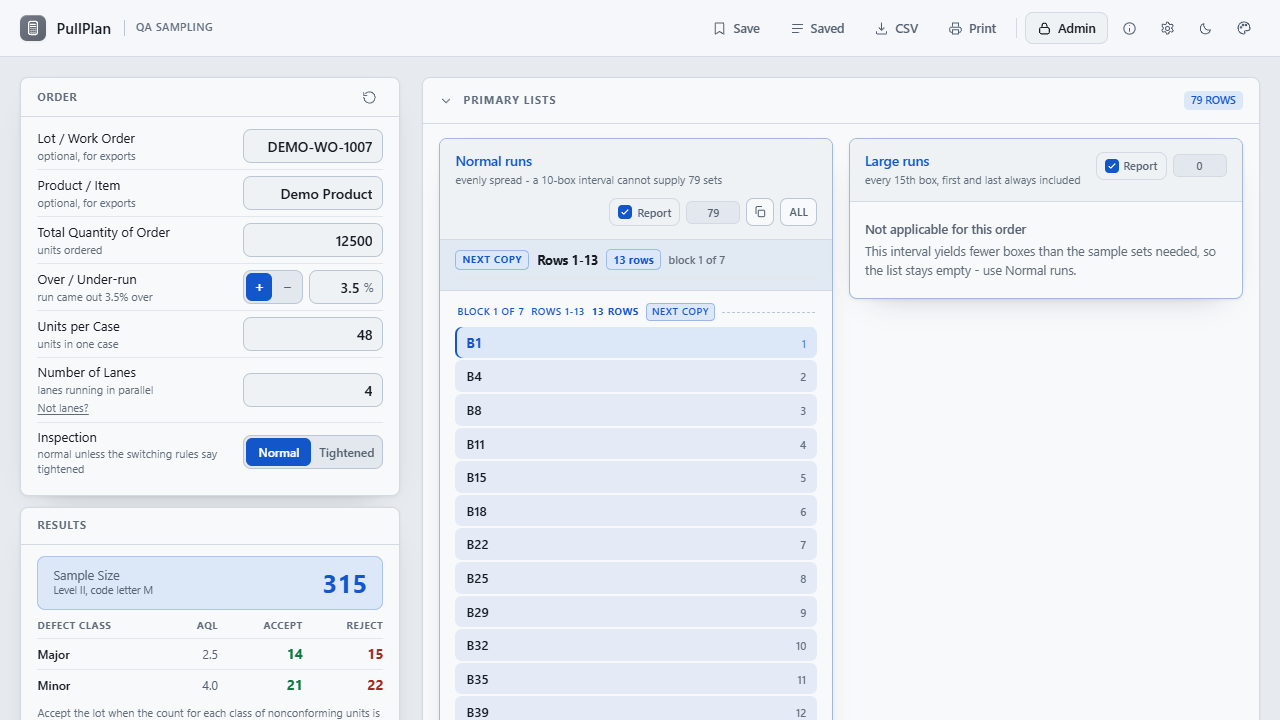
PullPlan with the demo order loaded: order details, normal inspection, and results with accept and reject numbers for two defect classes on the left, the Normal runs and Large runs pull lists on the right.
The demo order: 12,500 units with a 3.5% over-run, 48 per case, four lanes. On the AQL tables at level II that is code letter M, a sample of 315 taken as 79 sets across the lanes, Major accept 14 and reject 15, and the boxes to pull it from.
Price
$149 once, for your whole organization.
Delivery
Download straight after payment. One HTML file that opens in Chrome or Edge, with starter settings workbooks: no install, no launcher, no network.
Updates
Version 1.8.1 today. Every 1.x release, from the same download link.

Watch it work

A demo order, from quantity to signed record, in half a minute.

The walkthrough built into PullPlan: the demo order, the plan and the sets it comes to, the lists to pull, the inspection record and the report it prints, saved orders, and the settings that make it yours. It has no sound; the captions tell the story.

How it works

Three steps, and the file keeps the record.

Enter the order

Quantity ordered, how far the run came out over or under, units per case, and how many lanes are running. Tick the tests, choose Normal or Tightened inspection, and name the lot and product if the record needs them. The results appear as you type.

Read the plan

Level II, code letter M, a sample of 315, Major accept 14 and reject 15. The sample size and each class's accept and reject numbers come from the AQL tables, or from your own table; the case count comes from the units per case and the sample sets from the lanes. Every figure says where it came from.

Pull and record

Show the lists that match how the line samples and copy them to the sheet a block at a time. Enter the nonconforming count for each class and the disposition; a count larger than the sample, or one that is not a whole number, is questioned before anything is filed. Then save the order and print the report to sign, or export the CSV.

What it does

Everything in the file, in one list.

The default wording is a packaging line’s, and Major at 2.5 and Minor at 4.0 on level II is only where the file starts. Every one of those is a setting, meant to match the plan your quality system actually specifies.

Sizing the sample

The arithmetic, pinned by tests
  • AQL tables: every inspection level, normal and tightened, AQL 0.010 to 1000
  • The code letter, and accept and reject numbers for up to six defect classes
  • Or a lot-size band table you control
  • The actual run, from the quantity ordered and the over- or under-run
  • Rounding that matches Excel and Sheets, not the browser
  • Sample sets: the sample divided across the lanes, always rounded up

Pull lists

Which containers to take
  • Every 10th sampled container to start, or every 15th on a long run, first and last always included
  • Spacing tightens on its own when the run is too short to yield the sets needed
  • Every container, fixed grids, and lane pairs
  • Copy in blocks the size of your sample sheet, or the whole list at once
  • Says when a list pulls more sets than the sample needs, and can thin it to exactly the sets needed
  • Sample count: one row per container, and how many samples that container owes

The record

What gets filed
  • Lot or work order and product references on every export
  • CSV with the order, the results, and every list as a column
  • CSV and printed report carry the sampling plan: level, code letter, accept and reject numbers
  • A printed report dated the day of the inspection, with any list held back from it named
  • The inspection record: counts judged accept or reject as they are typed, the disposition, and lines for the inspector and the reviewer to sign
  • A count larger than the sample it came from, or one that is not whole, stops the save
  • Up to 300 orders kept on the computer, to reopen and reprint with their record

Fits the floor

Your words, your table
  • Rename units, cases, boxes, and lanes to what the line calls them
  • Settings as an Excel workbook, a sheet per kind with a note on every row: edit it in Excel and reload it on every workstation
  • Export suggests a dated copy, so the shared workbook is not written over
  • Supervisor code before Settings open on a shared workstation
  • Demo order and captioned walkthrough built in
What it is not

PullPlan is a calculation aid and a record of one lot. It applies the AQL tables, or the table it is given, and shows its working; it does not choose an inspection level or AQL, track switching between normal and tightened inspection, certify conformance to a standard, or replace the judgment of the quality professional who signs the plan. It is not a quality management system: saved orders stay in that browser on that computer, and the CSV and the printed report are what goes in the file.

Price

$149, once. Every workstation you have.

One payment licenses PullPlan to your organization, not to a seat, so every workstation on the line can carry it. The download starts as soon as payment completes, the link is emailed to you, and the same link fetches every 1.x update. Stripe sends the receipt and an invoice for your records.

All sales are final. PullPlan is a one-time purchase, not a subscription, and the copy you download is yours to keep. Watch the walkthrough to see whether it fits before you buy.

PullPlan goes on sale soon.

Coming soon - $149Watch it work

If there is ever a 2.0. It is a new purchase; your 1.x license keeps working and keeps getting 1.x releases.

Questions before or after buying go to support@alderworks.dev and reach someone who worked on PullPlan. Answered by email, as soon as we can; we do not promise a response time.

What IT will ask. The license agreement that comes in the download, what the tool sends and stores in security, and what a purchase shares with us in privacy.

Checking the file. The current download is PullPlan_1.8.1.zip, 3,972,102 bytes. Its SHA-256 fingerprint is below; anyone can confirm the file they received is the one we published by running certutil -hashfile PullPlan_1.8.1.zip SHA256 on Windows or shasum -a 256 PullPlan_1.8.1.zip on a Mac, and comparing.2eacf87af498a1736c8bb006b01fc8b365c20e501f09f1dc31538b17123fa9f0
Also from Alderworks

The readings from that sample, checked against spec.