EquipLogCalibration due dates and records

Know which equipment is due for calibration, and what happened last time.

One file, offline, with the records in an Excel workbook your shop already shares. Home shows what is overdue and what is due in the next 30 days. Staff record each calibration, who did it, the result and the certificate, and a Pass moves the next due date on. The register and every record live in that one workbook in the shop’s folder. It runs in Chrome or Edge on your computer, with nothing to install and nothing sent anywhere.

Coming soon - $249Watch it work
Calibration and maintenanceComing soon
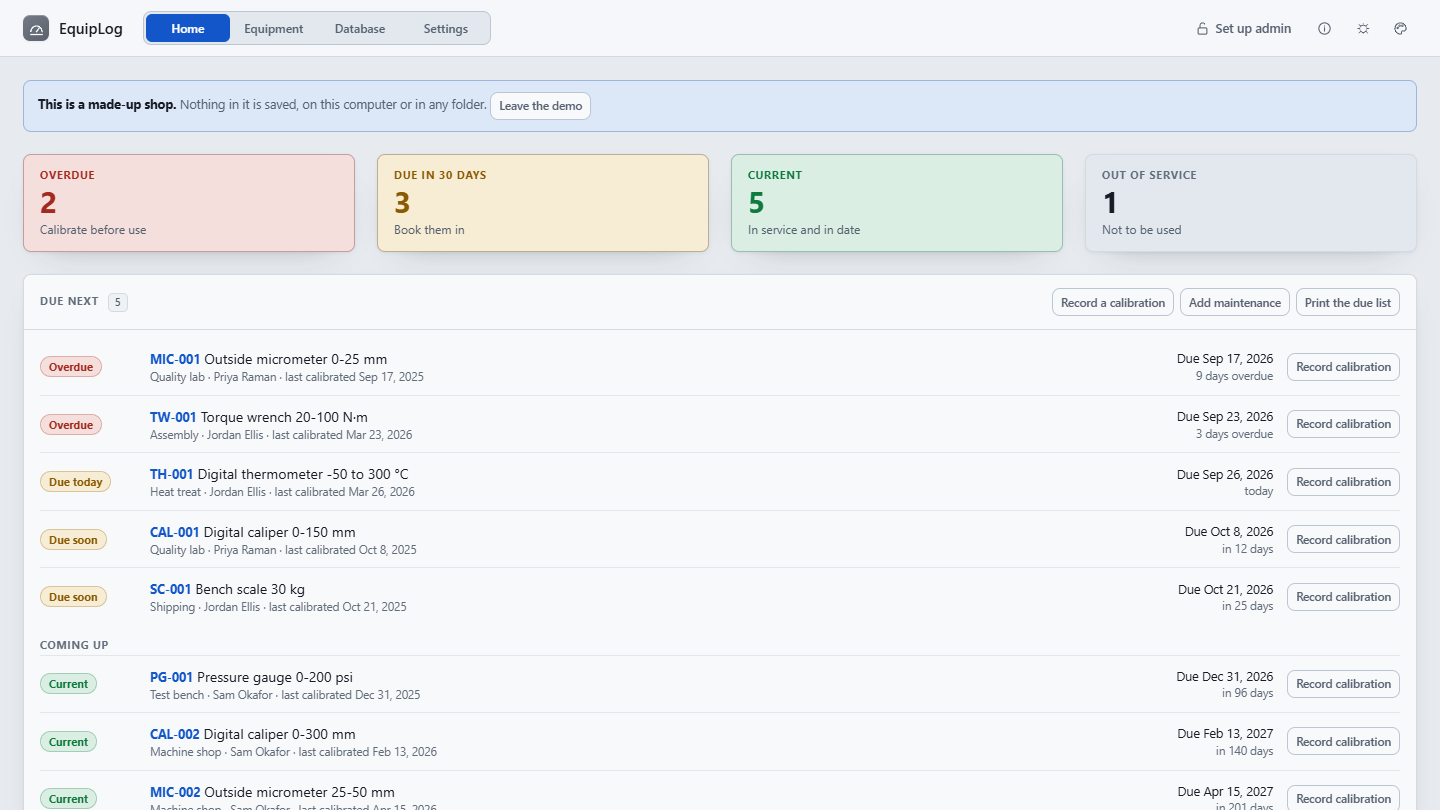
EquipLog's Home page for the made-up shop: tiles counting 2 overdue, 3 due in 30 days, 5 current and 1 out of service, over the list of what is due next, each with Record calibration.
Home in the made-up shop: what is overdue, what is due soon, and the list of what comes next.
Price
$249 once, for your whole organization.
Delivery
Download straight after payment. One HTML file that opens in Chrome or Edge: no install, no server, no account, no network.
Updates
Version 1.1.0 today. Every 1.x release, from the same download link.

Watch it work

From what is due to what happened, in half a minute.

The walkthrough built into EquipLog, played on the made-up shop: Home, the equipment register, recording a calibration, one instrument’s history, the workbook in the shared folder, and staff and admin. It has no sound; the captions tell the story.

How it works

Three steps, and every instrument goes the same way.

Set it up once

Make a folder everyone who records calibrations can open and write to, such as a shared drive or a synced folder, and choose it in EquipLog. Choose Set up admin and set a passcode. Add each instrument on Equipment, with its interval and next due date, or fill in the blank template in Excel and open it. Every other computer chooses the same folder and reads the same workbook.

See what is due

Home counts what is overdue, due in the next 30 days, current and out of service, and lists what is due next. Print the due list for the bench, or add the due dates to a calendar so they come to you.

Record what happened

Record the calibration: the date, who did it, in house or at a lab, the result, as found and as left, and the certificate. A Pass moves the next due date on; a Fail takes the instrument out of service. The record is saved into the workbook straight away, and the instrument's history keeps every one.

What it does

What is due, what happened, and one workbook that keeps both.

Try it before you set anything up: Try it with a made-up shop, on the first screen, opens thirteen instruments with some overdue, some due soon and a history behind them. Nothing in the demo is saved, and a blank template and a demo template are there to fill in in Excel.

What is due

At a glance, the moment it opens
  • Home counts what is overdue, due in the next 30 days, current and out of service
  • The list of what is due next, each with its location, owner and last calibration
  • A tile opens the register filtered to it
  • Equipment lists the register to search, filter by status and due date, and sort
  • An asset ID opens the instrument's details and its whole history
  • How many days count as due soon is yours to set; 30 to start with

Record what happened

Every calibration, and the maintenance
  • The date, who calibrated it, and in house or at which lab
  • The result, Pass, Adjusted or Fail, with as found and as left
  • The certificate number, and the certificate file kept in the shared folder, opened from there
  • The work order number from your own system, on a calibration or a maintenance entry, found by the search
  • A Pass or Adjusted moves the next due date on by the instrument's interval
  • A Fail leaves the due date as it is and takes the instrument out of service, unless you clear that box
  • A maintenance log for each instrument: the date, what was done and who did it

One Excel workbook

In the shop's shared folder, no server
  • EquipLog Database.xlsx holds the register, the calibrations, the maintenance and the settings
  • Each change is saved into it as it is made
  • If someone else saved it since, EquipLog does not save over theirs: Load the latest reads theirs and puts yours on top
  • Every record has an ID made once and never reused, so reading the workbook twice changes nothing
  • Chrome and Edge read and write the folder; another browser can open a copy and download it again
  • Nothing is sent anywhere, and certificates are never copied into the workbook

Staff and an admin

Staff record, the admin keeps the register
  • Staff record calibrations and maintenance, search the register and print
  • With a passcode set, only an admin adds and edits equipment, changes intervals and due dates, and retires or removes anything
  • The admin also sets the company name for printouts, what you call an asset ID, and what counts as due soon
  • One Admin button beside About; unlocking or locking reaches every tab on that computer
  • Until a passcode is set, EquipLog says that no admin is set up

Paper, calendars and the next step

Everything that leaves the file
  • Print the due list, or one instrument's history, on plain paper
  • Add due dates to a calendar: one all-day event per due date, for Outlook, Google Calendar or Apple Calendar
  • Add the calendar file again after the dates move, and the events move rather than doubling up
  • Export for Alderworks EMS writes the register as a CSV with the EMS equipment import's headings
  • Export maintenance for Alderworks EMS writes the maintenance as completed work orders for the EMS import
  • Open an EMS export reads the EMS equipment, calibration history and completed work orders, and shows what it would change first
  • Download a blank template or the demo template, each with a How to use this sheet, to fill in in Excel
Honest about what it is

The admin passcode stops accidents, not people: it is kept in the workbook as a one-way check, never as the passcode itself, and anyone who can edit that workbook in Excel can clear it. What keeps the records honest is who can write to the shared folder. A forgotten passcode is cleared on the workbook’s Settings sheet, and a new one set in EquipLog.

What it is not

EquipLog is a record-keeping aid, not a validated calibration management system. It does not check readings against tolerances or decide whether an instrument is fit for use: the result it keeps is the one you record. Check that the records it keeps meet your own quality system before relying on them.

A closer look

The record, the history, the workbook and the settings.

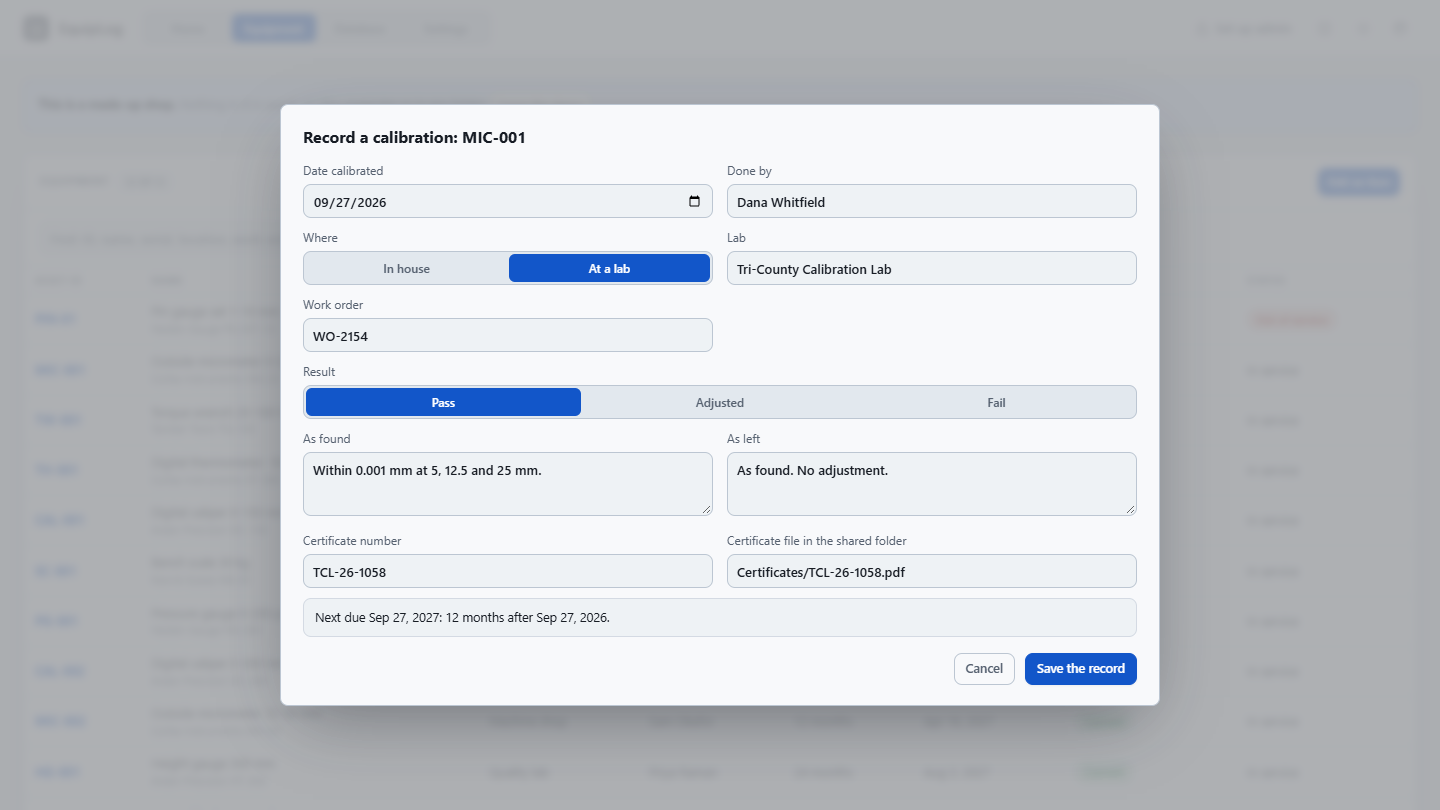
EquipLog's Record a calibration form for MIC-001 in the made-up shop: done by Dana Whitfield at Tri-County Calibration Lab, a Pass, as found and as left, the certificate number and its file in the shared folder, and the next due date a year on.
Recording a calibration: who did it and where, the result, as found and as left, and the certificate. The next due date is worked out before you save.
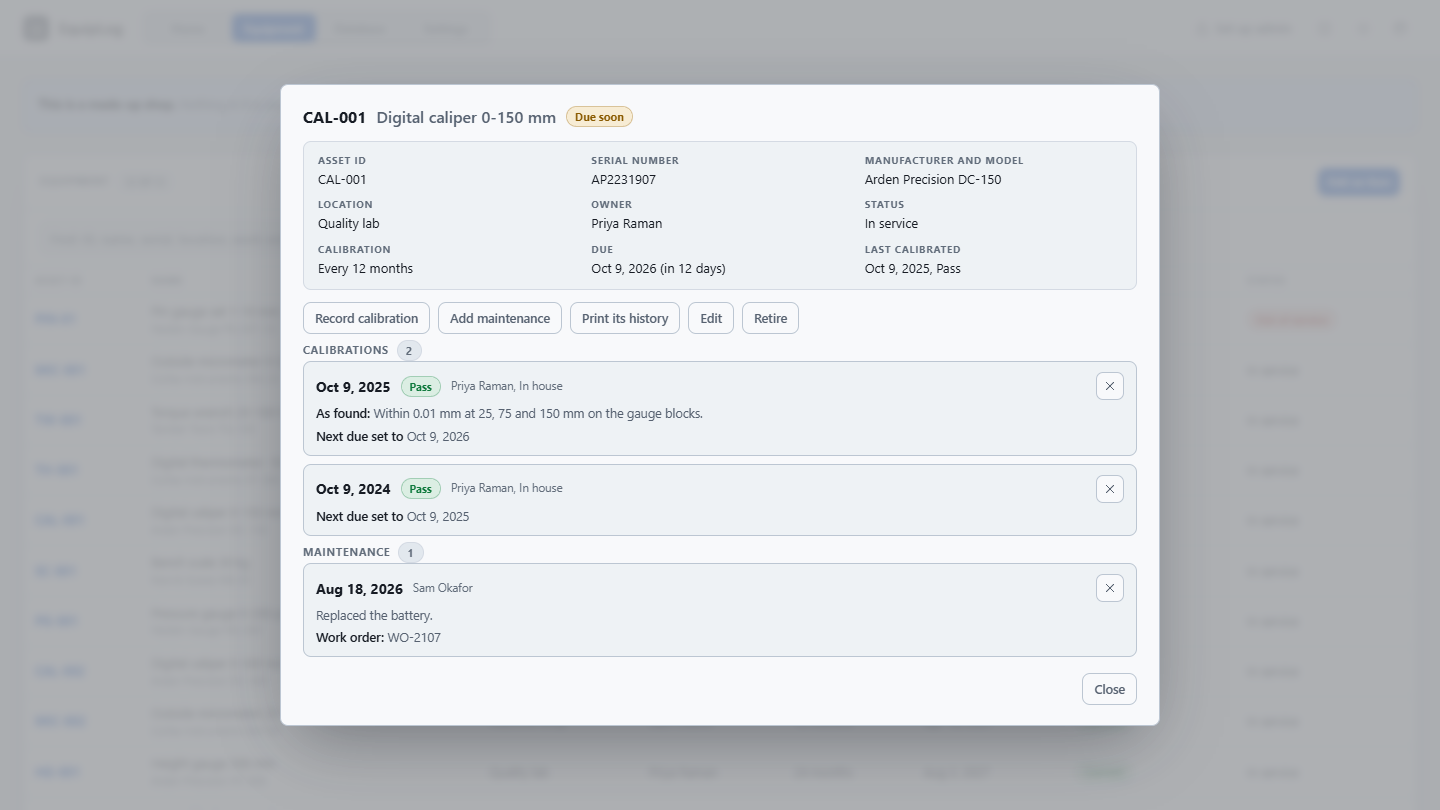
One instrument in EquipLog: a digital caliper's asset ID, serial number, location, owner, interval and due date, over its two calibrations and a maintenance entry, with Print its history.
One instrument and its whole history: every calibration, every maintenance entry, and Print its history for the paper file.
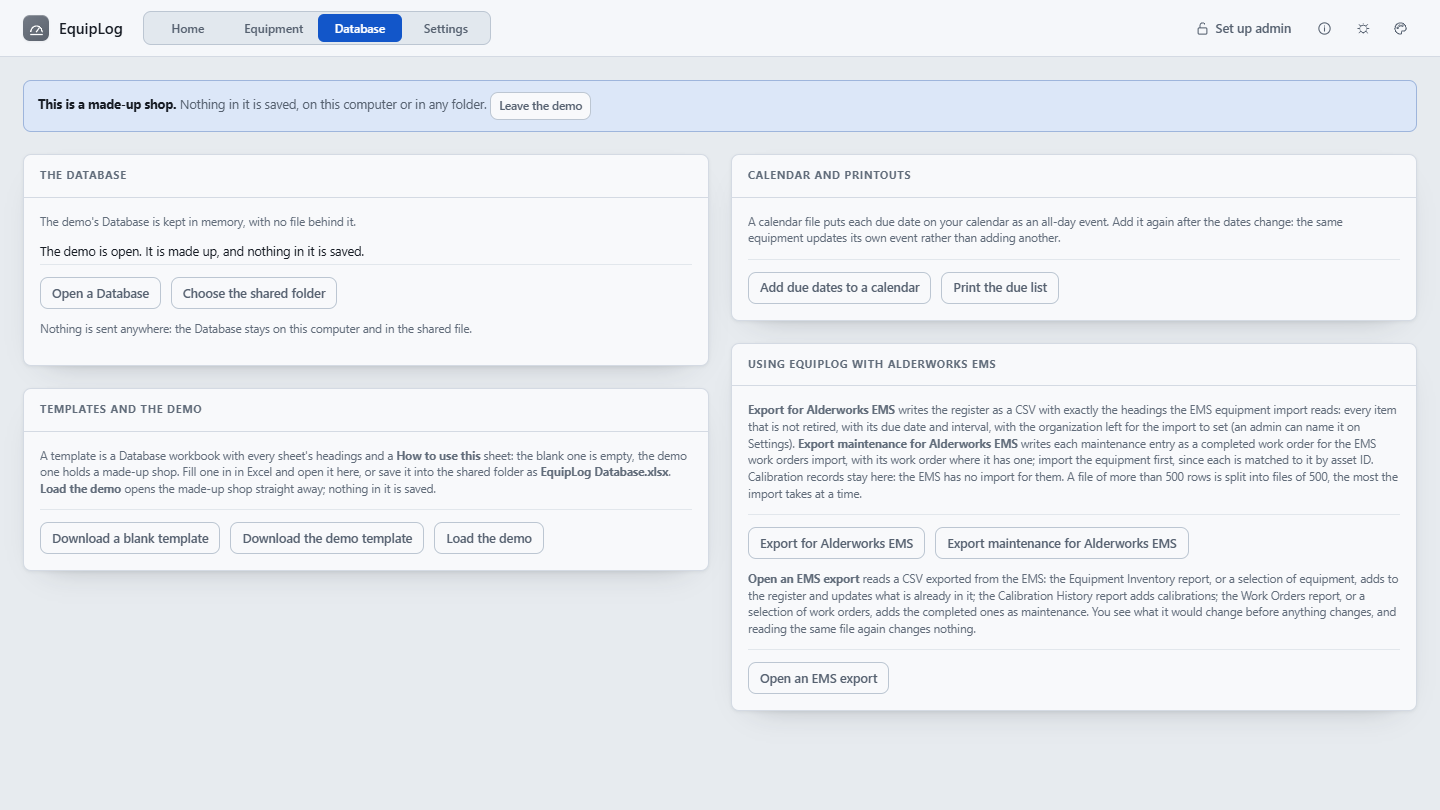
EquipLog's Database page: the Database in the shared folder, blank and demo templates, Add due dates to a calendar, Print the due list, and using EquipLog with Alderworks EMS: Export for Alderworks EMS, Export maintenance for Alderworks EMS and Open an EMS export.
The Database page: the workbook in the shared folder, templates to fill in in Excel, calendars and printouts, and Alderworks EMS exports, both ways.
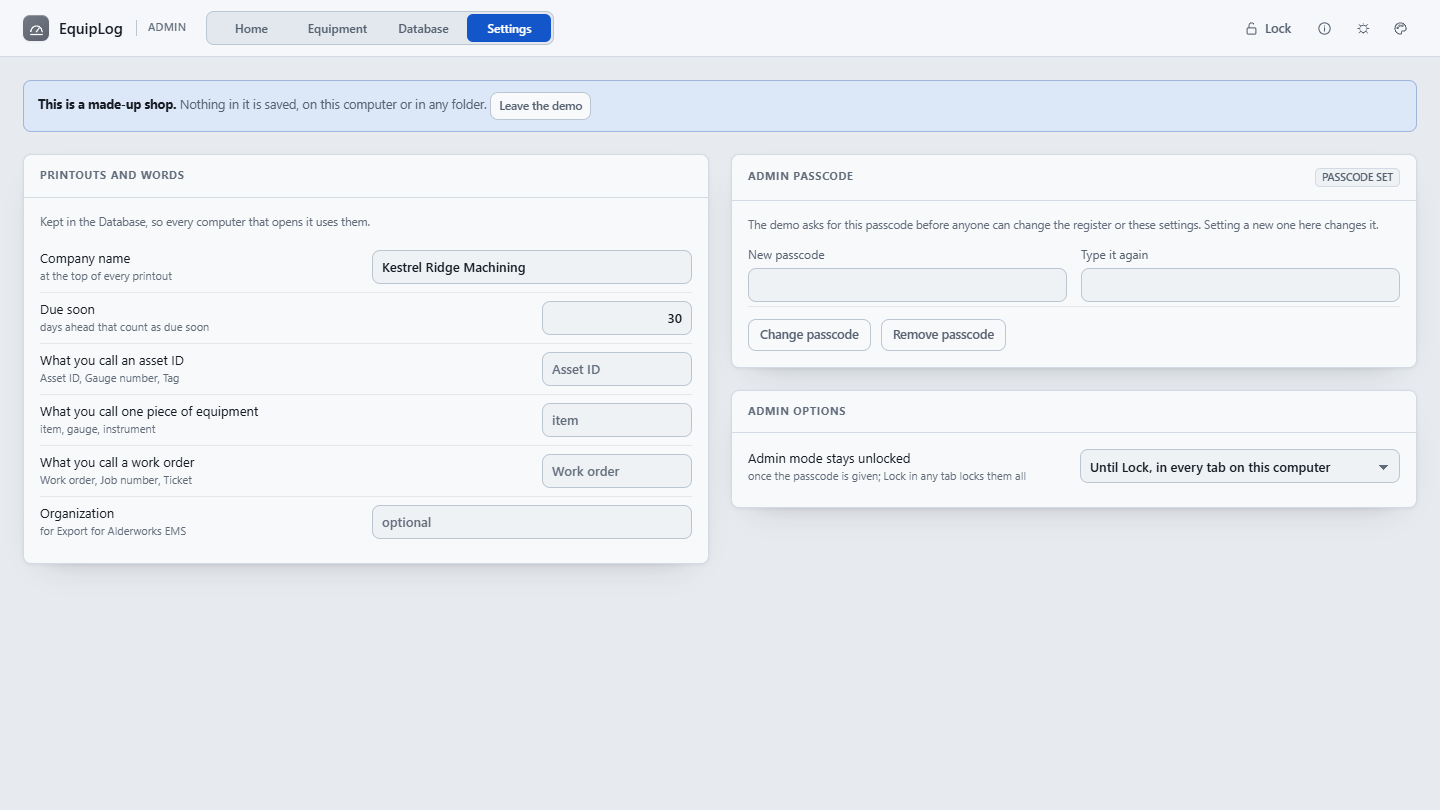
EquipLog's Settings page in admin mode: the company name for printouts, how many days count as due soon, what the shop calls an asset ID, the admin passcode and admin options.
Settings, for the admin: the company name on printouts, what counts as due soon, your own words for an asset ID, and the passcode.

Where it fits

One shop’s log, or a whole calibration program.

Both keep equipment in date and the record of what was done. They are built for different sizes of the same job, and a shop can start with one and move to the other.

EquipLog

One shop, offline, no accounts. The register, every calibration and every maintenance entry in one Excel workbook in the folder the shop already shares, on the computers it already has. Bought once, and nothing is sent anywhere.

Alderworks Equipment Management Software

A hosted calibration program for a quality team: reference standards and their certificates, preventive maintenance and work orders, reminders by email, several sites, a role for each person and a recorded trail, and the calibration certificates it writes for you. A subscription.

Moving from one to the other

EquipLog's Database page works with Alderworks EMS both ways. Export for Alderworks EMS writes the register with exactly the headings the equipment import reads, and Export maintenance for Alderworks EMS writes the maintenance as completed work orders; the calibration records stay in EquipLog. Open an EMS export reads the EMS's equipment, calibration history and completed work orders into EquipLog, so a shop and a team on the EMS can work side by side.

Price

$249, once. Your whole shop, every computer you have.

One payment licenses EquipLog to your organization, not to a seat, so everyone who records a calibration and every admin can use it. The download starts as soon as payment completes, the link is emailed to you, and the same link fetches every 1.x update. Stripe sends the receipt and an invoice for your records.

All sales are final. EquipLog is a one-time purchase, not a subscription, and the copy you download is yours to keep. Watch the walkthrough to see whether it fits before you buy.

EquipLog goes on sale soon.

Coming soon - $249Watch it work

If there is ever a 2.0. It is a new purchase; your 1.x license keeps working and keeps getting 1.x releases.

Questions before or after buying go to support@alderworks.dev and reach someone who worked on EquipLog. Answered by email, as soon as we can; we do not promise a response time.

What IT will ask. The license agreement that comes in the download, what the tool sends and stores in security, and what a purchase shares with us in privacy.

Checking the file. The current download is EquipLog_1.1.0.zip, 3,897,390 bytes. Its SHA-256 fingerprint is below; anyone can confirm the file they received is the one we published by running certutil -hashfile EquipLog_1.1.0.zip SHA256 on Windows or shasum -a 256 EquipLog_1.1.0.zip on a Mac, and comparing.07ca8fefe70219546e1f321e6a85a364316444b9f41bb12af4894510328c66c0
Also from Alderworks

The hosted calibration program, and the rest of the shelf.