AQSEvery Alderworks app in one file

Six apps, one file, one team folder, one admin.

The Alderworks Quality Suite is PullPlan, SpecRun, ShiftHandover, RetainLog, CoverPlan and EquipLog in one file, and each of them works exactly as it does on its own. A sidebar moves between them. The team shares one folder, one light or dark and color setting, one admin, and one set of lists for people, customers, items, jobs, machines and equipment. Work goes from one app to the next without typing it twice. It runs in Chrome or Edge on your computer, with nothing to install and nothing sent anywhere.

Coming soon - $599See it
Quality and manufacturingComing soon
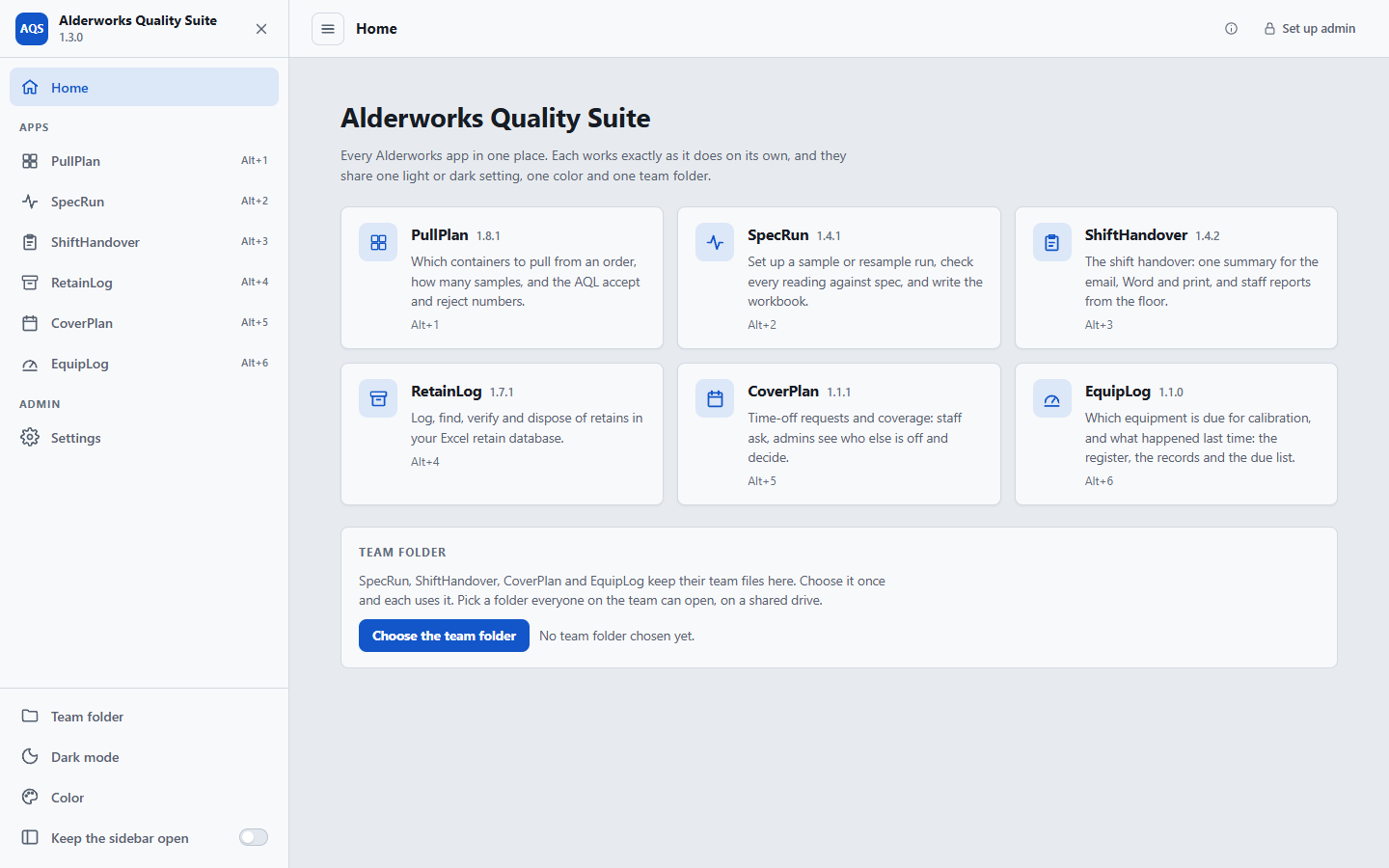
The Alderworks Quality Suite Home page: the six apps as cards with their versions and shortcuts, the sidebar listing them, and the team folder waiting to be chosen.
Home: the six apps, each one click or one shortcut away, and the team folder every app uses.
Price
$599 once, for your whole organization. The six apps bought separately come to $1,294.
Delivery
Download straight after payment. One HTML file that opens in Chrome or Edge: no install, no server, no account, no network.
Updates
Version 1.3.0 today. Every 1.x release, from the same download link.

See it

The apps you know, with one sidebar around them.

Each app’s own walkthrough is on its page, and plays from its About inside the suite: PullPlan, SpecRun, ShiftHandover, RetainLog, CoverPlan and EquipLog.

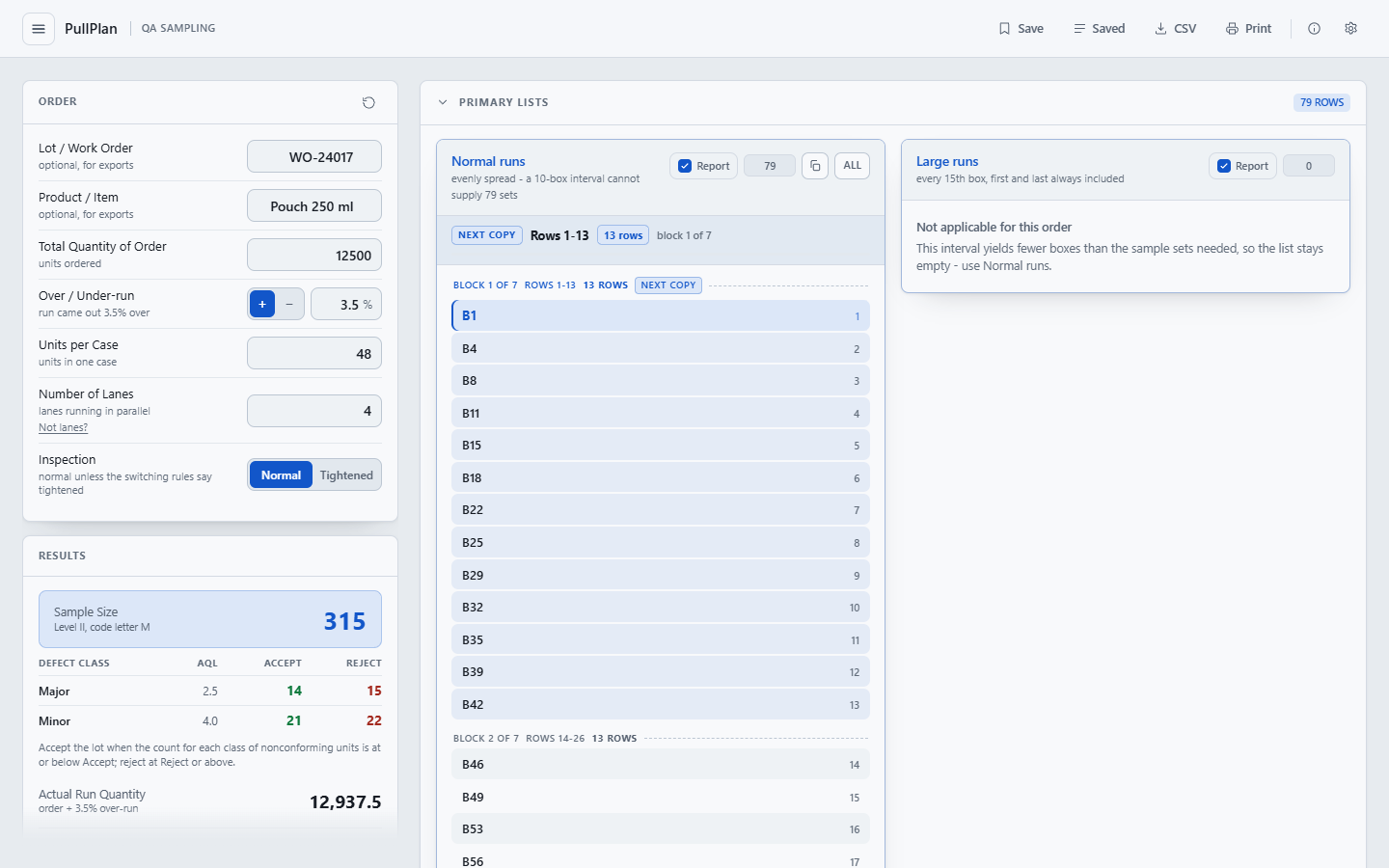
PullPlan open in the Alderworks Quality Suite, working out a sampling plan and pull list for an order exactly as it does on its own, with the menu button at the top left.
An app open in the suite: PullPlan, as it is on its own, with the menu button at the top left.
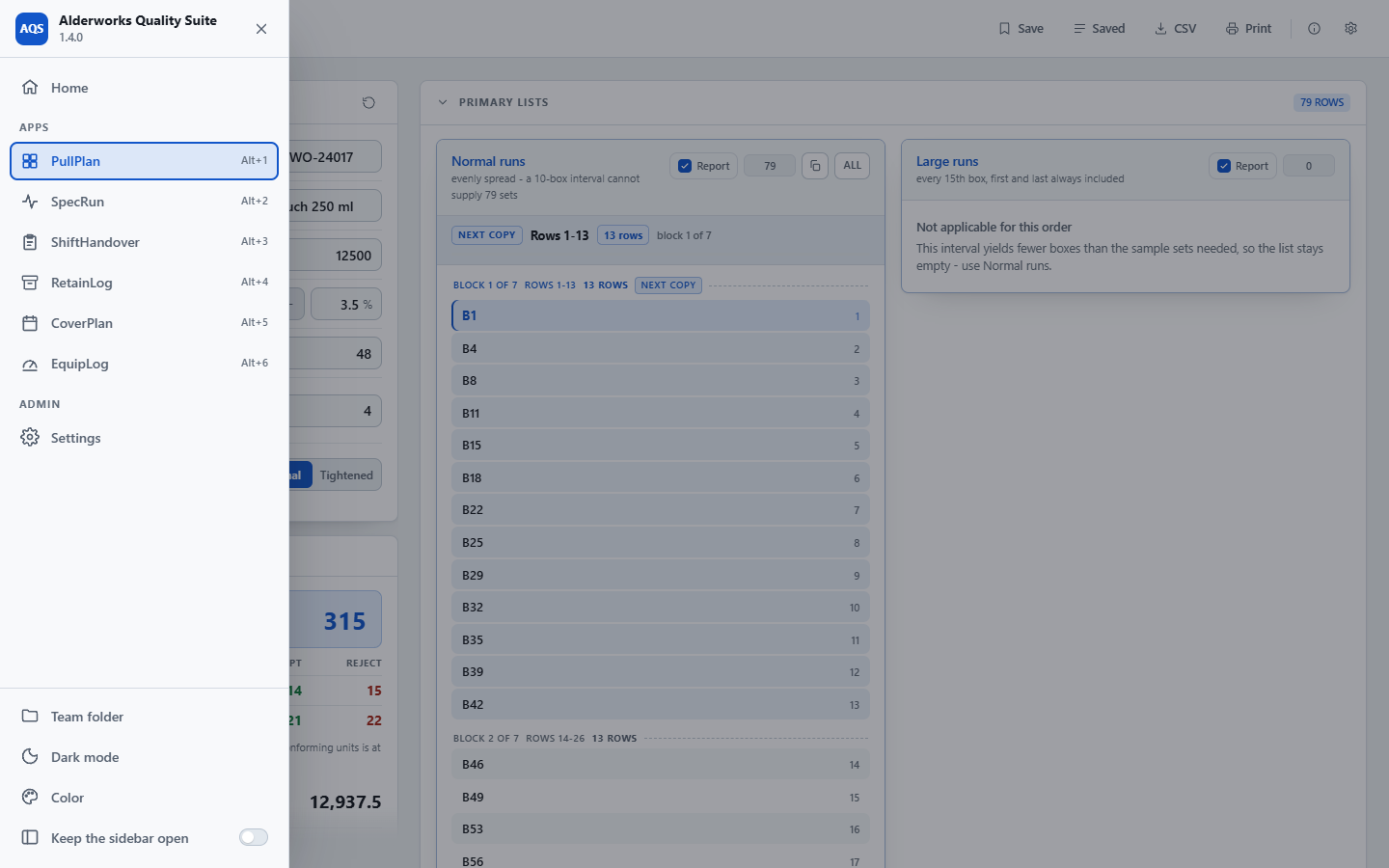
The Alderworks Quality Suite sidebar open over PullPlan: Home, the six apps with Alt+1 to Alt+6, Settings, and the team folder, dark mode, color and admin controls.
The sidebar: every app one click or one shortcut away, and the team folder, light or dark, color and admin in one place.
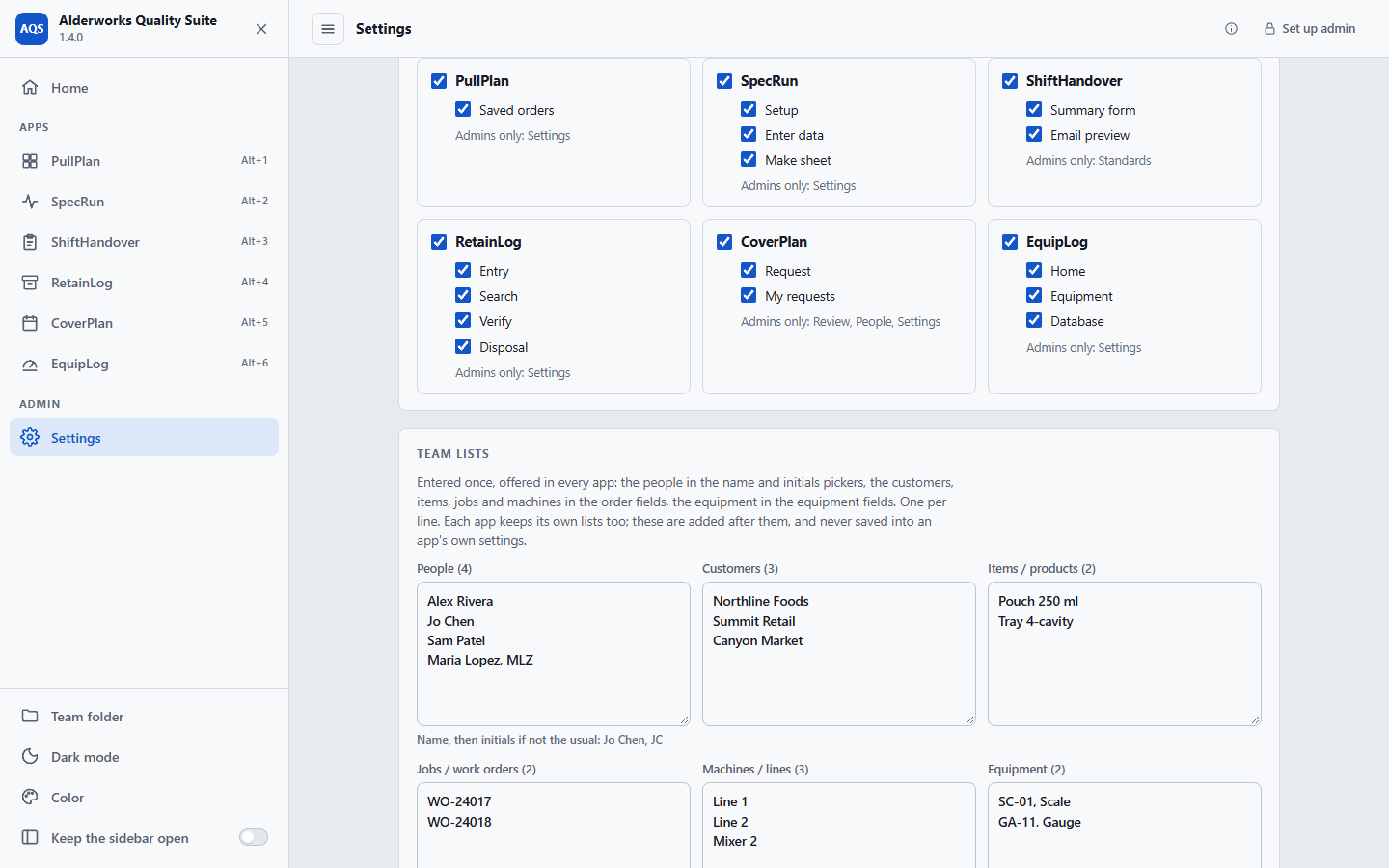
The Alderworks Quality Suite Settings page: a checklist of the apps and pages the staff see, and the team lists of people, customers, items, jobs, machines and equipment.
Settings: which apps and pages the staff see, and the team lists every app offers.
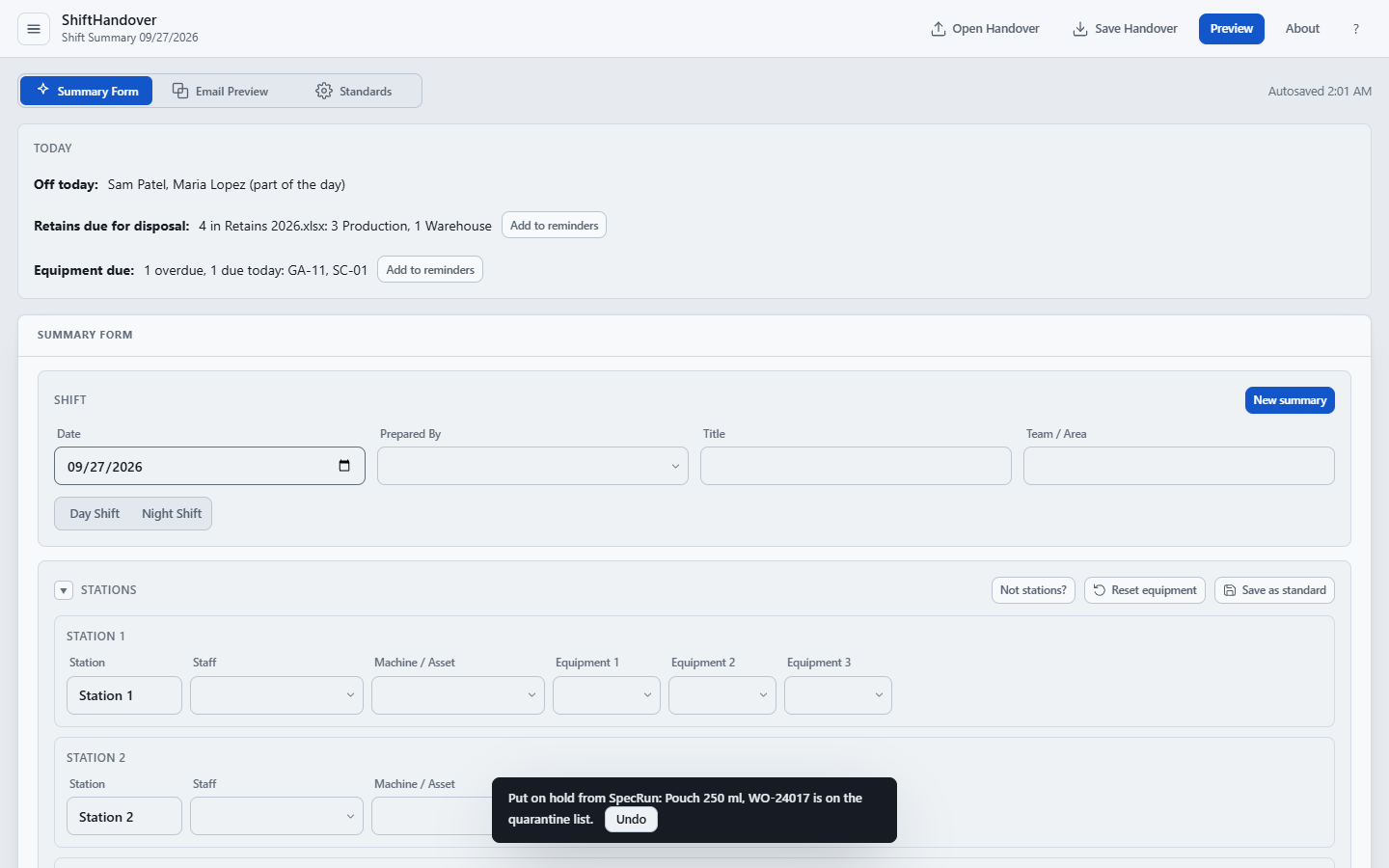
ShiftHandover in the Alderworks Quality Suite, its Today card showing who is off from CoverPlan, the retains due for disposal from RetainLog and the equipment due from EquipLog, with a failed SpecRun test just put on the quarantine list.
The handover, with who is off today, the retains due for disposal, the equipment due, and a failed test put on hold from SpecRun.

How it works

Set up once, for every app at the same time.

Set it up once

Extract the whole zip and open Alderworks Quality Suite.html in Chrome or Edge. On Home, choose the team folder: a folder everyone on the team can open and write to, on a shared drive. Choose Set up an admin to name the first admin and their passcode, then fill in the team lists on Settings and save them to the team folder.

Everyone works in the app they need

Open an app from the sidebar and use it the way it works on its own. The team lists are offered in every app, and where one app's work belongs in another, a button hands it on: an order to a run, a run to a retain, a failed test to the handover.

Admins decide what the floor sees

Sign in with your passcode to open every app's settings and admin pages. Choose which apps and pages the staff see, and Lock puts every app back in staff mode. Every computer that uses the team folder follows the same admins and the same choices.

What it does

What the six share, and what they hand each other.

Nothing inside an app changes. What the suite adds is around them: one place to open them, one folder, one admin, one set of lists, and the hand-offs between them.

The apps

Each one, exactly as it is on its own
  • PullPlan, SpecRun, ShiftHandover, RetainLog, CoverPlan and EquipLog, in one file
  • Each app works exactly as it does when bought alone, with its own pages, files and About
  • New: EquipLog. Which equipment is due for calibration, and what happened last time, in one Excel Database in the team folder
  • A sidebar opens any app; Alt+1 to Alt+6 switch between them and Alt+0 goes Home
  • An app stays open once opened, so switching back and forth loses nothing
  • One light or dark setting and one color, for every app at once

One admin

Named admins, one Lock
  • Until someone is named, everyone is admin, as each app is on its own
  • Set up an admin names the first admin and their passcode; add more on Settings
  • Each admin signs in with their own passcode, and every app's settings and admin pages open
  • Lock puts every app in staff mode at once
  • Admins choose which apps, and which pages inside them, the staff see
  • CoverPlan's admins carry over, each with the passcode they already have

Team lists

Entered once, offered in every app
  • People, customers, items, jobs, machines and equipment
  • Offered in every app, after that app's own lists
  • Gather from the apps fills them from what the apps already know on that computer
  • Never written into an app's own settings

Hand-offs

Work goes from one app to the next
  • A PullPlan order starts a SpecRun run, with the job, product, lanes and containers to pull
  • A SpecRun run logs a retain in RetainLog, filled in from the run
  • A failed SpecRun test goes on the ShiftHandover quarantine list, with Undo
  • The handover shows who is off today, from CoverPlan, the retains due for disposal, from RetainLog, and the equipment due today, from EquipLog
  • Nothing is saved until someone saves it in the app it went to

The team folder

Chosen once, used by every app
  • Choose it once on Home, and every app that keeps team files uses it
  • ShiftHandover keeps its handovers there, CoverPlan its settings and requests, SpecRun its team settings, EquipLog its Database
  • Alderworks Settings.xlsx holds the admins, what the staff see and the team lists
  • Every computer that chooses the same folder follows the same settings
Honest about what it is

Admin passcodes, staff passwords and settings passcodes stop mistakes, not people. Who can change the shared files is decided by who can write to the team folder. Each app also keeps what it keeps on each computer, as it does on its own, so a separately bought app opened in the same browser finds the same work.

What it is not

The Alderworks Quality Suite is a record-keeping and scheduling aid, as each of its apps is. It is not a validated quality management, laboratory, statistical process control or calibration management system, or a payroll, timekeeping or HR system of record, and it does not by itself certify compliance with any standard, regulation, customer requirement or leave policy. It does not calibrate, test or verify equipment, or decide whether an instrument is fit for use. Check that your plans, limits, methods, records and decisions meet your own requirements before relying on them.

Price

$599, once. All six apps, your whole team, every computer you have.

One payment licenses the Alderworks Quality Suite to your organization, not to a seat, so every member of staff and every admin can use it. Bought one at a time, the six apps come to $1,294. The download starts as soon as payment completes, the link is emailed to you, and the same link fetches every 1.x update. Stripe sends the receipt and an invoice for your records.

All sales are final. Alderworks Quality Suite is a one-time purchase, not a subscription, and the copy you download is yours to keep. Watch each app's walkthrough on its own page to see whether it fits before you buy.

The Alderworks Quality Suite goes on sale soon.

Coming soon - $599See it

If there is ever a 2.0. It is a new purchase; your 1.x license keeps working and keeps getting 1.x releases.

Questions before or after buying go to support@alderworks.dev and reach someone who worked on Alderworks Quality Suite. Answered by email, as soon as we can; we do not promise a response time.

What IT will ask. The license agreement that comes in the download, what the tool sends and stores in security, and what a purchase shares with us in privacy.

Checking the file. The current download is AlderworksQualitySuite_1.3.0.zip, 10,849,529 bytes. Its SHA-256 fingerprint is below; anyone can confirm the file they received is the one we published by running certutil -hashfile AlderworksQualitySuite_1.3.0.zip SHA256 on Windows or shasum -a 256 AlderworksQualitySuite_1.3.0.zip on a Mac, and comparing.3e4cd6fb1fbf411d3b5cf411070f7699d106a519bc543c3a2b2c5a8d37c1737f
Hosted, coming soon

The same suite, hosted, as a subscription.

Not available yet, and nothing here can be bought. We plan to offer the Alderworks Quality Suite hosted, for teams that would rather not keep a file and a shared folder, on two plans billed by the month, or by the year for the price of 10 months. Until then, the suite is the download described above.

Team: $79 a month

One site, up to 15 people. Or $790 a year, billed annually.

Plant: $199 a month

Several sites, up to 75 people. Or $1,990 a year, billed annually.

Also from Alderworks

Each app on its own, and the rest of the shelf.